How Do I Purchase a Subscription?
Purchase a subscription for your child via our website, the Apple App Store or Google Play. You can cancel at any time.
Jump to your platform: Website · Apple App Store · Google Play
For current pricing, please visit our pricing page.
Via the website
- Next to your child’s name, click the green ‘Buy Now’ button, or click ‘Buy Now’ in the left-hand menu.

- On the Purchase page, use the drop-down menus to select the child whose subscription you would like to purchase and your preferred currency, then click the blue ‘Add’ button.
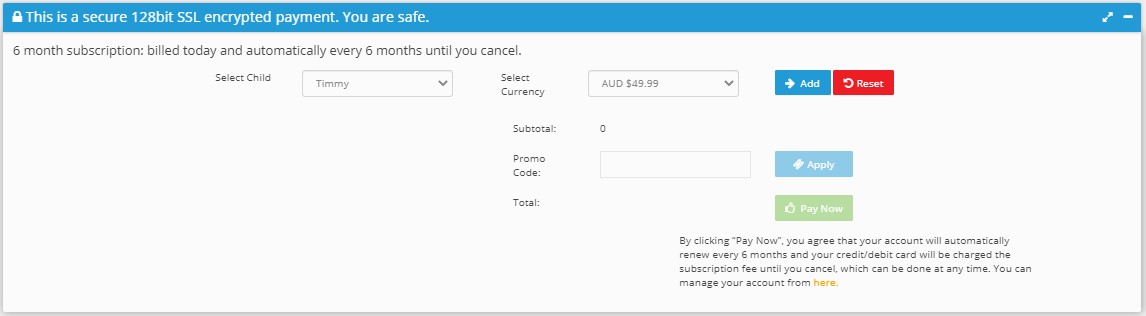
- Click the green ‘Pay Now’ button.
- In the window that appears, enter your card details and click ‘Pay Now’. A confirmation message will appear once payment is successful.
You can now instantly continue playing the games. To purchase a subscription for another child, repeat the steps above.
Watch the steps in action:
Via the Apple App Store
You can purchase a subscription directly through the Apple App Store. Open the Phonics Hero app, go to your account and follow the in-app purchase prompts, or visit our page on the Apple App Store to subscribe.
Please note: App Store subscriptions are managed separately from our website. If you need to cancel, you will need to do so via the App Store.
Via Google Play
You can also subscribe through Google Play. Open the Phonics Hero app, go to your account and follow the in-app purchase prompts, or visit our page on the Google Play Store to subscribe.
Please note: Google Play subscriptions are managed separately from our website. If you need to cancel, you will need to do so via Google Play.
